Custom ERP
Your company’s orders, stock and invoices without retyping
We build a custom ERP for small business that joins taking the order, the stock level and the invoice into one flow: you enter data once, and every employee sees their part. It is made for small companies in Poland that count goods in a spreadsheet and issue invoices in a separate program.
We will reply within 1 working day with questions about your goods and documents, and after a call you get a quote by stage.
- An order reserves the stockNo one can sell the same item twice.
- Stock is visible at onceA dispatch updates stock the same moment.
- Documents create themselvesDelivery note and invoice from the order data.
- No double entryData entered once flows on by itself.
- Process automation
- from 8,000 PLN
- CRM / ERP system
- 20–90k PLN
- Example ERP with orders, stock and invoices
- 38–46k PLN
How many times do you type the same order?
Four signs that the spreadsheet no longer keeps up.
- Now
A stock level that does not match
The spreadsheet says the goods are there. They are not on the shelf, and the client already has a confirmation.
With the systemAn order reserves the goods at once, and the stock changes with every movement.
- Now
The same thing typed three times
An order from email goes to a spreadsheet, then to the invoicing program, then onto a delivery document.
With the systemYou enter data once, and the invoice and the delivery document take it from the order.
- Now
Margin worked out after the fact
The purchase price sits in one spreadsheet and the selling price in another. What the company earned on an order is known only at the end of the month.
With the systemThe margin is counted on every order and product as soon as the invoice is issued.
- Now
The question “where is my order?”
To answer the client, someone checks the spreadsheet, the warehouse and the mail.
With the systemThe status of an order is visible in the system to everyone with access.
What an ERP system does: one order leads to an invoice
A typical layout of an ERP for a small company that sells from stock. We fit the scope to your goods and documents; margin and turnover reports are a module that only the AI package of the example quotes includes.
- Layer 01
Orders
- Orders from email, the form and the phone on one list
- Goods reserved the moment an order is taken
- A status the team can see, with no chasing
- Layer 03
Documents
- An invoice issued from the order, with no retyping
- Issue and delivery documents as PDF
- Sending to KSeF (Poland’s National e-Invoicing System) when the system issues invoices
- Layer 04
Numbers
- Margin per order and per product
- Turnover and stock rotation over a chosen period
- Export to Excel for your accountant
This is what work on documents looks like
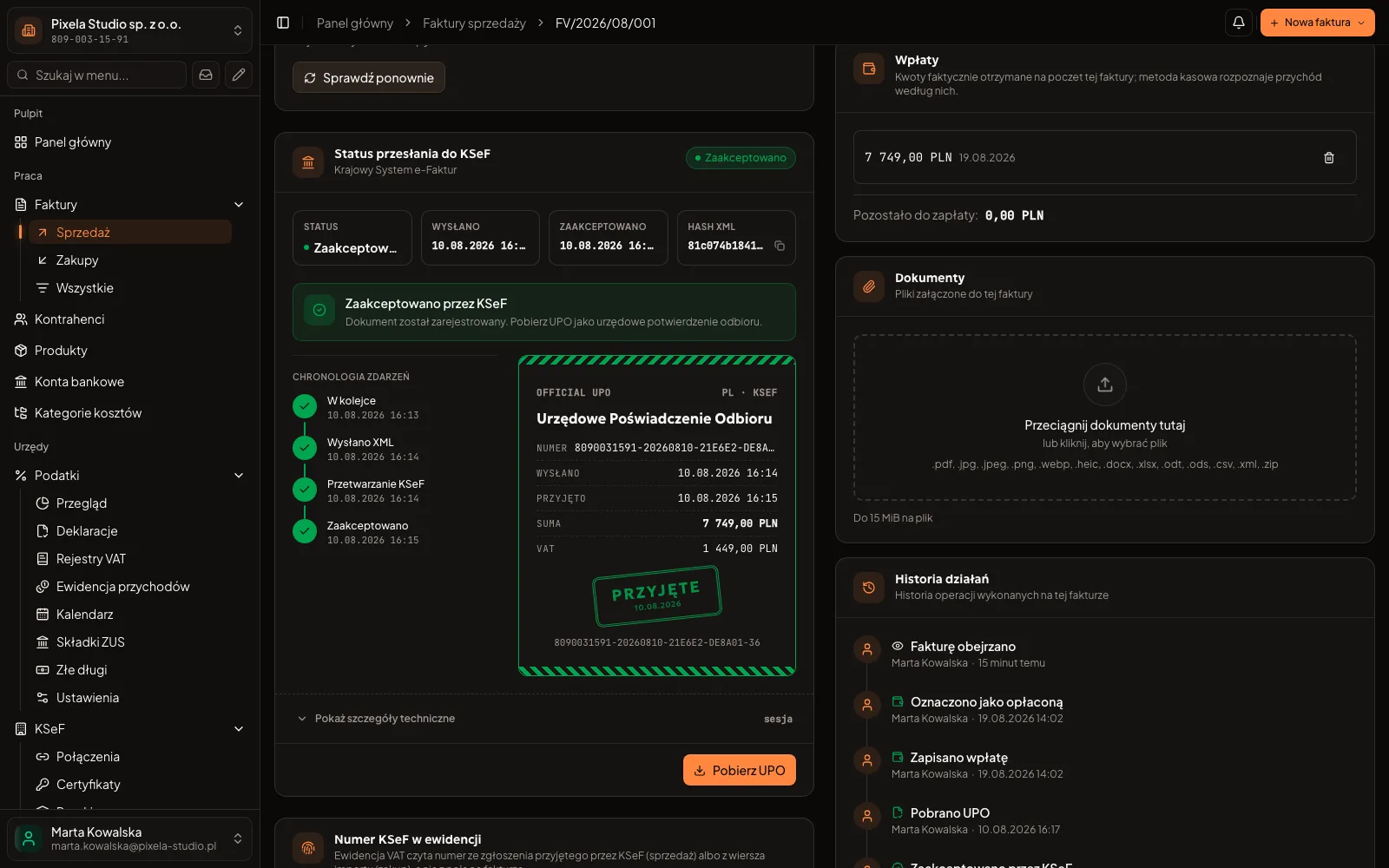
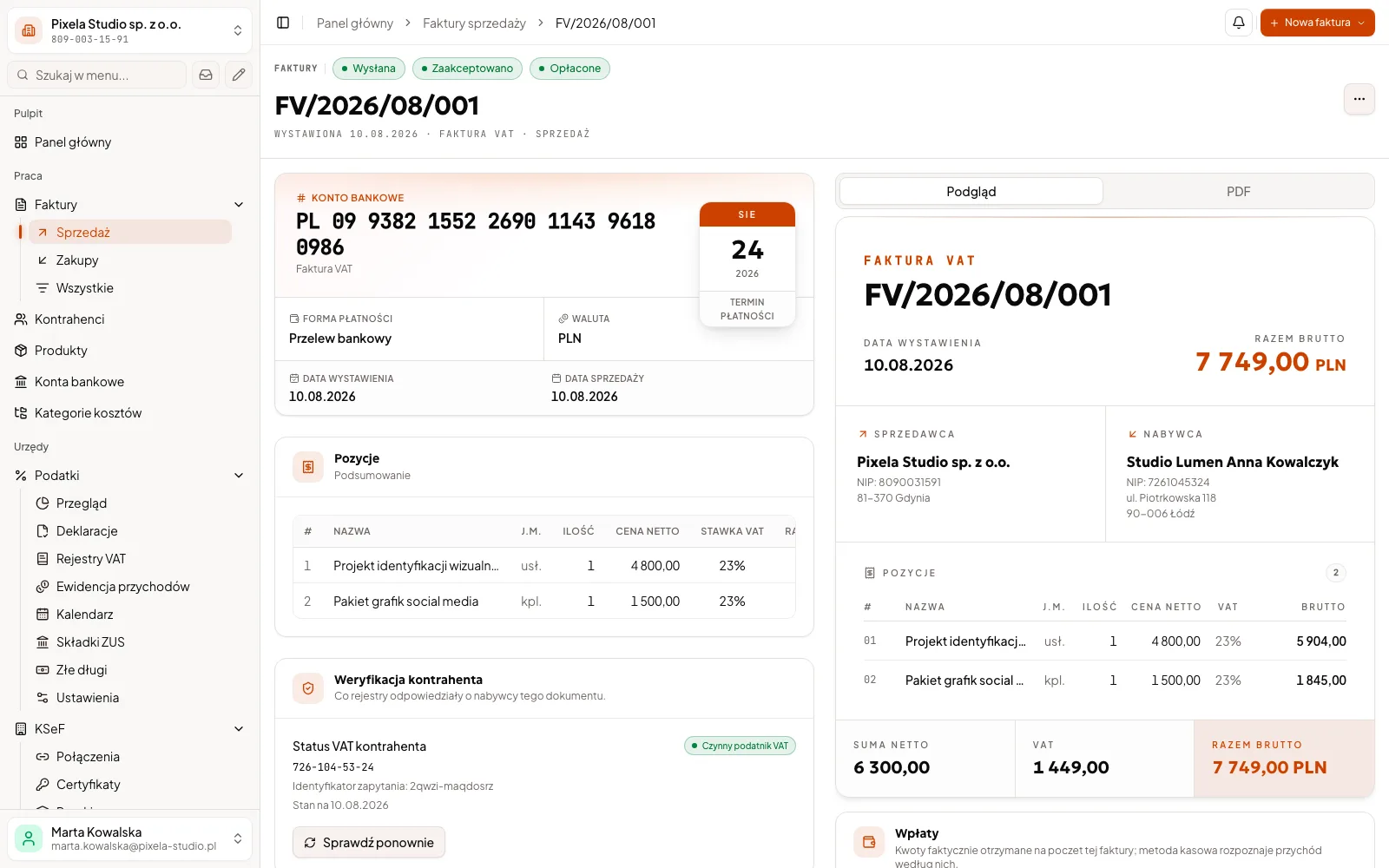
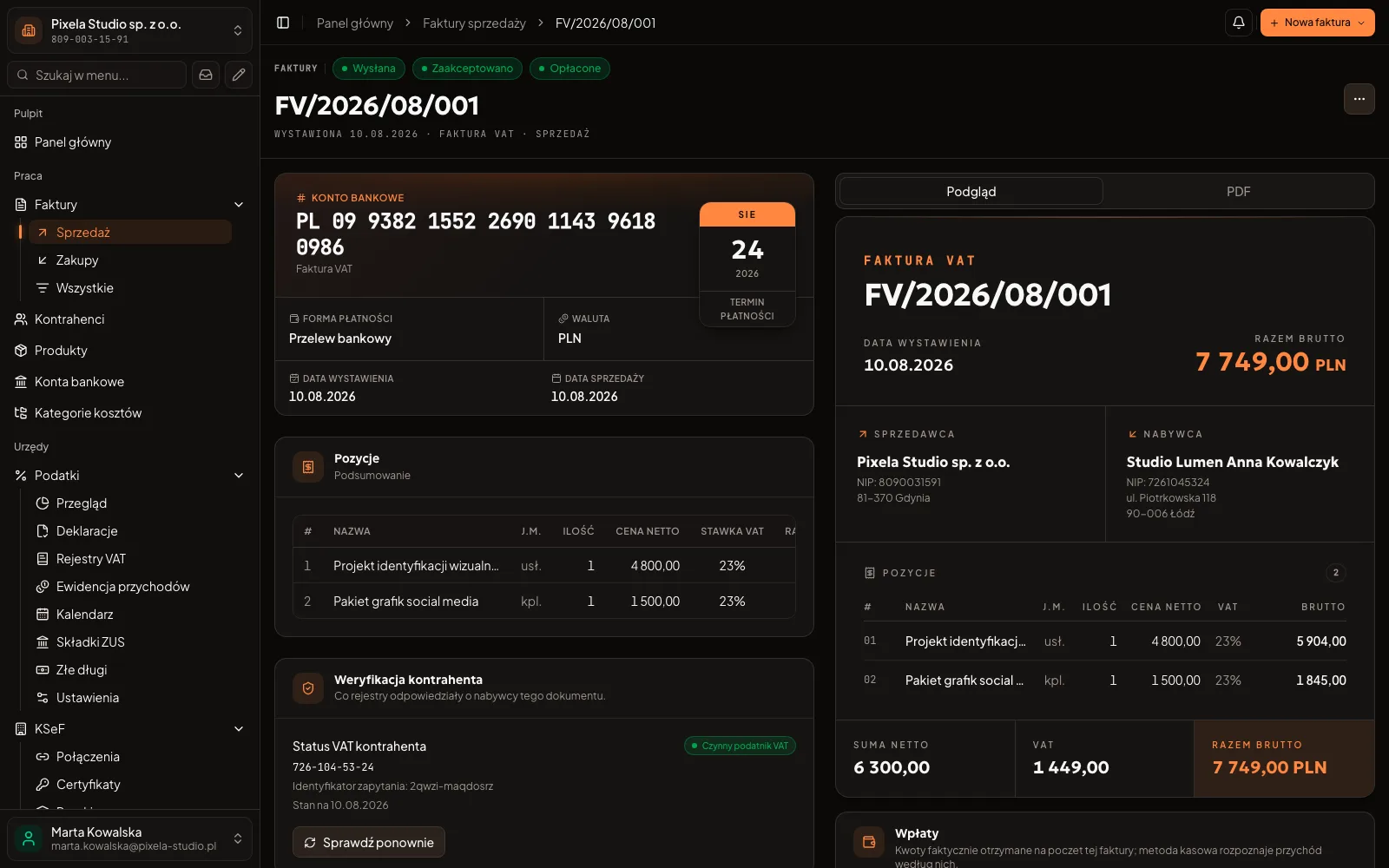
An invoice and the product catalogue from Biurko, our invoicing program. There are no stock screens here, because Biurko does not manage stock; in your ERP the warehouse gets screens of its own.
An invoice in Biurko: line items, a document preview and the VAT summary
A client project and our own product
11
weeks from kick-off to final sign-off in a client project: a system for a property manager
See the client projectStages with a signed record for a client, invoices and KSeF in our Biurko
We delivered a system for a manager of a commercial property portfolio in four stages, each closed with a signed record. It had no warehouse: the project shows how we run a build. The documents an ERP issues from an order we know from Biurko, our invoicing program with KSeF. Biurko does not manage stock, and we put together an ERP for your company from modules on the same principles.
See the Biurko case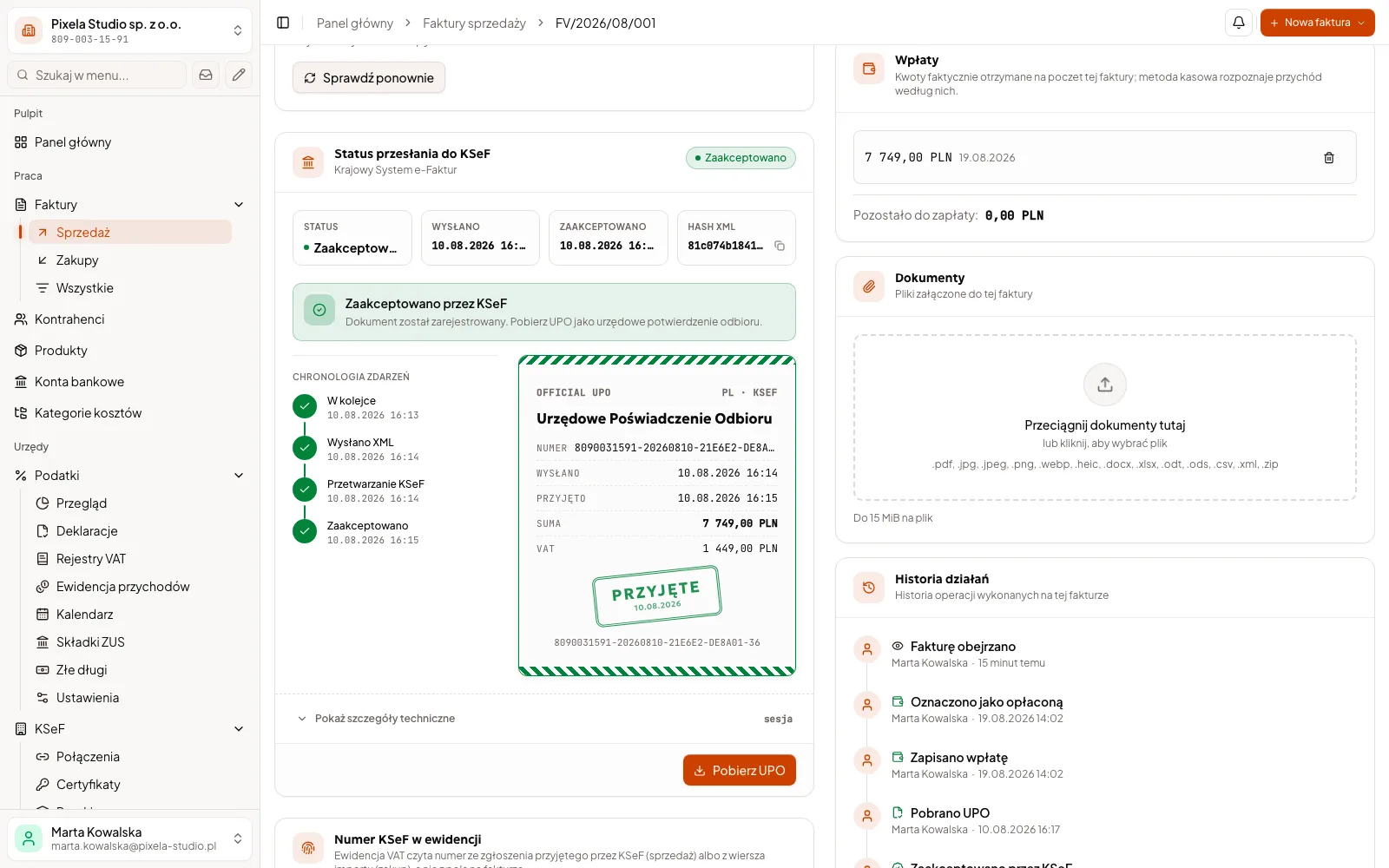
Where do you start, and what does an ERP system cost?
Two ERPs priced with the modules of the Pricing section on the home page, and a smaller start for a company that first wants to get rid of one piece of retyping.
02 / 03 · Orders and stock
ERP system
PLN 38,000–46,000
The system core (login, roles, panel), orders and invoices with KSeF, stock levels, and PDF documents with Excel import and export.
Ask for a quote for your ERP- Orders with goods reservation
- Stock levels with a history of movements
- Invoices and issue documents from the order
Example quote: net and approximate amounts. Unusual requirements widen the range, and you get a binding price after a call about your warehouse.
A ready-made stock program or a custom ERP?
A ready-made program for orders and stock is cheaper at the start and often enough. See when a dedicated ERP system pays off.
- Does it know your goods and documents?
- Ready-made programGood when the range and the flow of documents are typical.
- What makes up the cost?
- Ready-made programA fee per user or per module, growing with the company.
- What if your product range or supplier changes?
- Ready-made programChanges fit within what the maker foresaw.
- What about the data in your spreadsheets?
- Ready-made programImport by the vendor’s template, the rest you fix by hand.
- How fast can you start?
- Ready-made programA ready-made program starts faster. When it is enough, it is a good choice.
If a ready-made stock program is enough for you, we will say so plainly. We are also not the right fit when the budget does not reach the price of one automation from the packages above, or when you look for a programmer by the hour for your own team.
Questions about the ERP system
Price, the programs you already have, the warehouse, KSeF, time and support.
An example ERP with orders, stock and invoices with KSeF costs PLN 38,000–46,000 net, and with AI document reading and reports PLN 51,000–61,000. We priced both with the modules of the Pricing section on the home page. A smaller start is automating one process from 8,000 PLN. You get a binding price after a call about your stock and orders.
If it is enough, we will say so in the conversation. A ready-made program makes sense when your goods and documents are typical. A custom system pays off when orders, stock and invoices should connect the way you work.
You do not have to throw it away. If it issues invoices well and lets data be exchanged, the ERP passes orders to it and the invoices stay where they are today. If data has to be retyped from it by hand, the ERP can issue invoices with KSeF itself. Tax and bookkeeping stay with your accountant, and we choose together after looking at how you work.
Yes, if you need them. We keep stock separately for each warehouse, a transfer between them has its own document, and a barcode scanner works in the browser like a keyboard. You do the stocktake in the system, and the differences go into the history of movements. Each such module is a separate line in the quote.
We start by going through the spreadsheets: which columns are goods, which are the client, and which are a note. We load the data into the new system and show it on a test environment, and you check the numbers before the team starts working in it. The old spreadsheets stay with you as a copy.
Yes. An invoice is created from the order and goes straight to KSeF, and the system fetches supplier invoices from there. Since 1 February 2026 invoices have been received through KSeF, and since 1 April 2026 most companies have issued them there. Our Biurko has been sending invoices to KSeF since June 2026, and how we connect KSeF to a system of your own is described on the process automation page. Tax and bookkeeping stay with your accountant.
The usual time is in the block about stages above, and the binding timeline of each stage is in the quote: it depends on the number of goods, documents and warehouses. We take first what costs the most work, so the team uses the system before the rest exists.
Yes. We describe above, in the block about stages, when the rights to the code pass to your company, who looks after the server after launch and what it costs: you can stay with us or run the system yourself or with another company.
Related services
These usually go together with what you have just read.
- Custom CRM developmentClients, quotes and sales in one system
- Business process automationInvoices, KSeF and reminders without manual work
For your industry
Start with the goods
Show us how you count your stock
Describe in a few sentences how your company takes orders and counts stock. The spreadsheet that serves as your warehouse today you can send by email after our reply. We can meet online, and in Katowice and Silesia also in person.
- You write, and within 1 working day we ask about your goods and documents.
- We talk about orders, stock and invoices, and you show us how it looks today.
- You get a quote split into stages, with the price of each one.
A free automation map
We talk for up to 45 minutes about how you work. Within 3 working days of the conversation you get a 1–2 page PDF by email: 3–5 of your company's processes, where to start, and an approximate price and time range for the first stage. No commitment, and the document stays with you.